 AuthVertex
Home / Developers / Integration guide
Integration guide
How your application integrates with AuthVertex as a standard OpenID Connect client: tenant IDs, client registration, sign-in, logout, webhooks, agents and customer setup.
0. Tenant IDs are yours
AuthVertex does not invent tenant IDs. You create each customer organization from your back end, as the application owner, with your own tenant ID. It is required, unique per application environment and immutable: there is no update or re-key.
POST /v1/organizations

{"slug": "example-org", "display_name": "Example Org", "provisioning_mode": "scim_enforced", "tenant_id": "your-tenant-0042"}- Format: 1 to 128 characters of
A-Z a-z 0-9 . _ : -, compared byte for byte. Missing or malformed: 400. Already used in this application environment: 409. Never pass a value typed by an end user. - Find the organization again with Get organization by tenant ID. Anything outside your scope answers 404.
- Tokens carry it as
tenant_idnext toorg_id; every webhook carries it astenant_idnext toorganization_id.
Full request and response: Create organization.
1. Register a client
Register your application's OIDC client with Create client, as the application owner. The fields that matter most:
redirect_uris: exact, absolutehttpsURIs. There are no wildcard or prefix matches, and*is refused. Plain-http loopback URIs are accepted in sandbox only.backchannel_logout_uri: where AuthVertex posts logout tokens (step 3).post_logout_redirect_uris(optional, up to 20, same rules): the only places the browser is sent back to after you end the user's session at the discoveredend_session_endpoint. Replace the list later with Set post-logout redirect URIs.- Moving hosts: replace a registered client's redirect URIs with Replace redirect URIs (the full list; add the new host, deploy, then remove the old one) and its back-channel logout URI with Set back-channel logout URI (
nullclears it). Theclient_idand its credentials stay the same. permitted_organization_ids: a client is usable only by the organizations it is permitted for.token_endpoint_auth_method: a server-side client authenticates withprivate_key_jwt, giving its public keys inline asjwksor as ajwks_uri, or withtls_client_auth. Client secrets (client_secret_basic) are accepted in sandbox only; production refuses them with 422.- A browser or mobile client that cannot keep a key registers with
client_typepublicandtoken_endpoint_auth_methodnone, and always uses PKCE.
2. Sign users in
Authorization code flow with PKCE, with private_key_jwt client authentication. Read every endpoint from your issuer's discovery document, /.well-known/openid-configuration under the issuer.
- Create
state,nonceand a PKCEcode_verifier(43 to 128 characters). Sendcode_challenge= BASE64URL(SHA-256(code_verifier)) withcode_challenge_method=S256. - Redirect to the
authorization_endpointwithresponse_type=code,scope=openid, yourclient_idandredirect_uri,state,nonceand the challenge. - At the callback, check
state, then call thetoken_endpointwithgrant_type=authorization_code, thecode, theredirect_uri, thecode_verifierand a client assertion:client_assertion_type=urn:ietf:params:oauth:client-assertion-type:jwt-bearerandclient_assertion, a JWT signed with your private key whoseissandsubare your client ID, whoseaudis the token endpoint (or the issuer), with a uniquejti,iat, andexpat most 60 seconds later. - Verify the ID token with the SDK and the nonce you sent:
audmust be your client ID, andazp, when present, must equal it.
Any standard OpenID Connect client library performs steps 1 to 3. The AuthVertex SDKs (Coming) will verify what you receive: see the quickstarts.
Claims you receive
| Claim | Meaning |
|---|---|
sub | The stable AuthVertex user ID. Never an email; emails never link users. |
tenant_id | Your own tenant ID of the organization, the one you gave it at creation. Key your tenant on it: you need no table that maps AuthVertex organizations to your tenants. Always present next to org_id; the SDKs require it (missing_claim) and check its format (invalid_claim). |
org_id, membership_epoch | AuthVertex's organization ID of the session, and a counter of the membership that only increases. Required on organization-scoped tokens. Store the highest membership_epoch seen per (sub, org_id): a lower one is stale. |
application_id, environment | Must be your own. |
sid | The session ID that back-channel logout names. |
act, delegation_id, scope | Present on delegated agent tokens: the actor chain (RFC 8693), current actor outermost, at most 4 deep. |
cnf.jkt | The DPoP key thumbprint of a sender-constrained token. |
A verified token proves identity and delegation, never authorization: apply your own policy to org_id, roles and scopes.
3. Back-channel logout
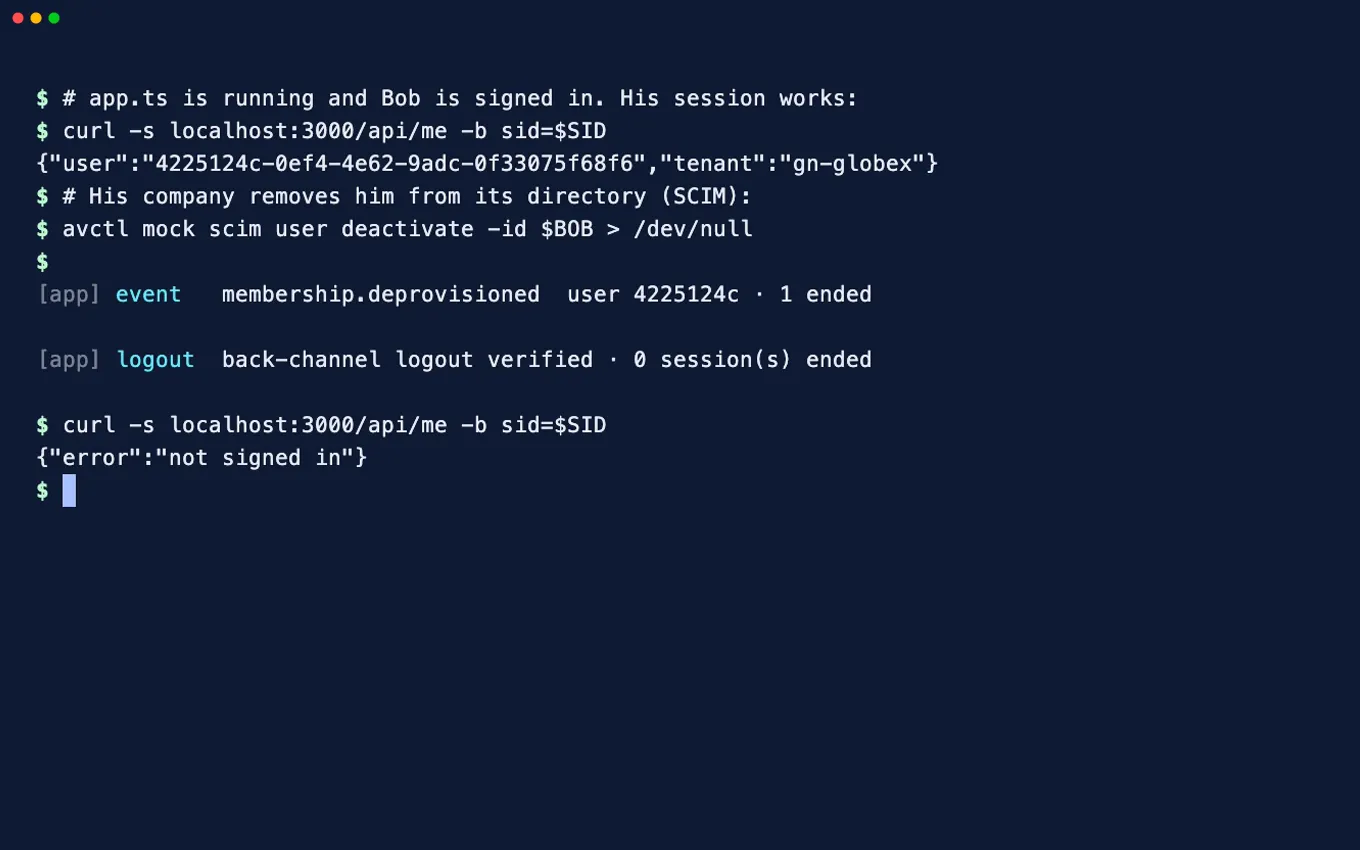
AuthVertex posts logout_token=<JWT>, form-encoded, to your backchannel_logout_uri when a session ends, including on suspension, deprovisioning and session revocation (OpenID Connect Back-Channel Logout 1.0).
Verify the token with the SDK's logout verifier: typ absent, JWT or logout+jwt; events containing the back-channel logout event; no nonce; sub, sid or both; iat within 5 minutes plus clock skew; and a jti used once. Then end every local session matching sid, or every session of sub when sid is absent.
Answer 200 only after the sessions are gone, and 400 otherwise so that AuthVertex retries. AuthVertex retries with the same token, so if a token you already processed arrives again (your 200 was lost), answer 200 again without logging out again: a 4xx would leave the logout reported as not enforced. While the first delivery of that token is still running, answer 503 so AuthVertex asks again later. The SDK handlers do exactly this, with Cache-Control: no-store.
4. Lifecycle webhooks
Register an endpoint with Create webhook endpoint: organization_id, client_ref, url, and optionally event_types and signature_scheme. Keep the returned endpoint_id.
The default scheme is v2: AuthVertex signs every delivery with its own key, you verify with its public keys from Get webhook signing keys, and you hold no shared secret. Only if you must keep a shared HMAC secret, also send secret_ref and signing_kid (scheme v1+v2, or v1). Raise the scheme later with Update webhook endpoint, from v1 to v1+v2 to v2; a v2 endpoint cannot be lowered.
Each delivery is a POST with a JSON body and these headers:
AuthVertex-Signature: t=<unix time>[,kid=<v1 key ID>,v1=<HMAC signature>][,v2kid=<v2 key ID>,v2=<v2 signature>]
AuthVertex-Event-Id: <event_id>
AuthVertex-Delivery-Id: <delivery_id>
AuthVertex-Endpoint-Id: <endpoint_id>   (informational: verify against your own configured endpoint ID)
What the SDK webhook handlers do:
- Read the raw body, at most 1 MiB, before any JSON parsing.
v2: look upv2kidin the signing keys (cache them for at most 5 minutes, and fetch again on an unknown key; old and new keys overlap during a rotation) and verify the signature overauthvertex-webhook-v2,t,v2kid, yourendpoint_idand the hex SHA-256 of the body, joined by line feeds.v1: look upkidin your secrets and compare HMAC-SHA256(secret,<t>.<body>) in constant time.- Once you trust v2 keys, a present
v2decides: a failingv2is refused even next to a validv1. Require v2 once your endpoint isv2, so av1-only header is refused. - Refuse a
tmore than 5 minutes away from now. - Deduplicate on
event_id: deliveries are at least once. Answer 2xx for a duplicate. - Check that
application_id,environmentandorganization_idare yours, then apply the event. - Answer 2xx only once the change is stored. Anything else is retried with exponential backoff for 24 hours.
Events carry identifiers, states and counts only: never emails, names, URLs, tokens or claims. Every type and field is in the webhook event catalog.
Acknowledge revocations
Suspensions, deprovisionings, session revocations and agent kill switches are tracked as enforcement evidence. After you have enforced one, report it with Acknowledge revocation, using the event's revocation_id, and read its state with Get revocation. The acknowledgment closes the loop in your customer's evidence report.
5. Agents (optional)
- An organization owner or an end user registers an agent and grants it a delegation with scopes and audiences; step-up authentication is required for the grant.
- Agent access tokens carry
actanddelegation_id, live 5 minutes or less, target one audience, and are sender-constrained with DPoP (RFC 9449,cnf.jkt). - A resource server verifies the token, then the proof:
typdpop+jwt, the embedded public key,htm,htu(normalized),iatwithin 60 seconds,ath(the token's hash),jktequal tocnf.jkt, and a single-usejti. A DPoP-bound token presented as Bearer is refused. The SDKs' resource verifiers do these checks. delegation.revokedandagent.disabledevents tell you to stop honoring a delegation; no new token is issued for it, and tokens already issued expire within minutes.- Scopes the organization marks as approval-required use OpenID CIBA in poll mode: the delegator approves the action on AuthVertex's hosted page with a passkey, and the result is a single-use token bound to that action. There is no SDK helper for the CIBA client flow yet; use a standard OAuth client.
6. Customer setup
Your application creates a time-limited link to the hosted setup portal with Create portal link and gives it to the customer's IT admin. The admin configures the SAML or OIDC connection, the SCIM directory, domains, role mappings and account matching there. You never handle their identity provider metadata or SCIM credentials.
7. Before production
- Walk through the sandbox scenario.
- Run the conformance kit against your sandbox endpoints.
- Check that every error code is handled: refused, never accepted.